 Virtual Manager
Service Billing App for Workshops and Small Businesses
Bill for repairs, labour, installation or delivery from the same app you use to track parts and customer balances. Set a fee for the work, record what the customer pays, and share one receipt.

Create a service bill with or without parts
- Open Settings → Sales Types and enable Service. An owner can choose which types are available for the business.
- In Sales, choose a customer and add a Service line. Enter the name of the work, the service date and the amount you charged.
- Add a Normal line for each part you take out of stock. For an item sold by quantity and rate that you keep outside inventory, enable and use Independent.
- On a wholesale sale, enter the amount received in Pay and save the sale. Share the receipt and record later payments against the customer’s account.
Example repair bill with a part and a labour charge
A workshop installs a part sold for Rs 3,000 and charges Rs 1,500 for labour. Enter the part as Normal and the labour as Service. The bill totals Rs 4,500 and the part comes out of inventory. If the customer pays Rs 2,000 on a wholesale sale, their account shows Rs 2,500 still due.
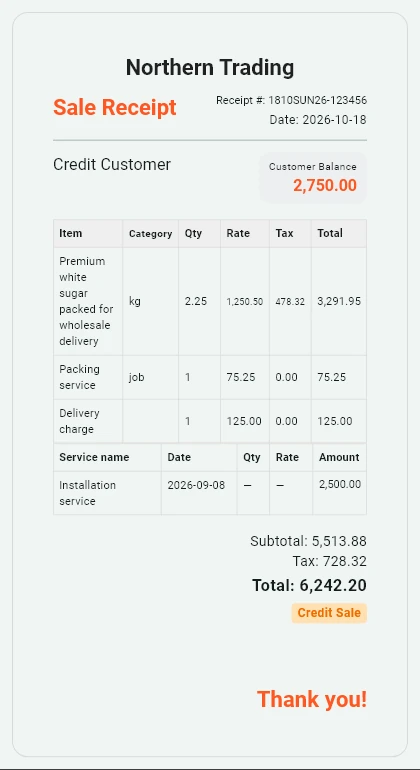
Use the service date to show when the work happened
If you finish a job on Monday and bill it on Wednesday, enter Monday as the service date. That date appears on the receipt and sale statement. The charge is counted under Wednesday’s sale date in financial reports.
You can type customer and service names in Urdu or English and share the customer’s PDF sale statement when they need their full payment history.
Keep customer credit and collections in view
Leave Pay empty on an unpaid wholesale sale or enter what you received. Use the customer khata to follow the remaining balance and the daily cash book to check when payment reached you.
For older records in a spreadsheet, the Excel import guide explains how to map a Line Amount and optional Service Date, then review the service rows before saving.
Can I bill for services offline?
Yes. In standalone mode you can record a service sale, save a payment and share a receipt without signing in. Staff in a shared workspace use the Sales Types enabled for the business.
This guide covers 1.9.13. Check store versions and release notes for your device.